Why 2026 Is a Turning Point for Azure Migrations
Cloud migration used to be a project. Today it’s a continuous discipline. Enterprises that treated their first move to Azure as a one-time lift-and-shift are now finding themselves re-architecting for cost efficiency, AI readiness, and resilience against a threat landscape that has changed dramatically since their original migration plan was written.
At HCT Infotech, we’ve guided mid-market and enterprise clients through dozens of Azure migrations, and the projects that succeed share a common thread: they treat migration as an opportunity to modernize, not just relocate.
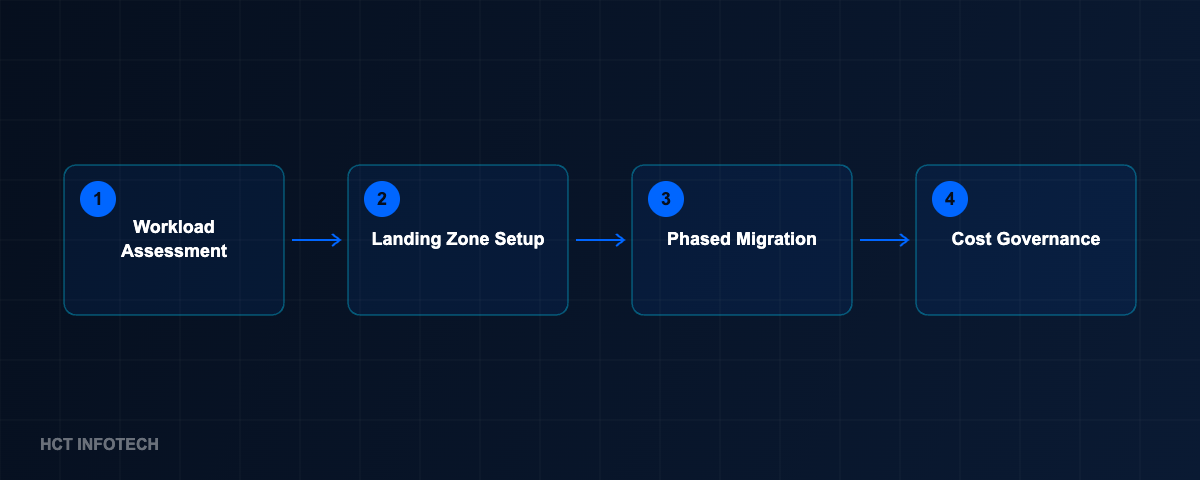
Step 1: Start With a Workload Assessment, Not a Server List
The biggest mistake we see is teams cataloguing servers instead of workloads. A workload assessment looks at how an application is actually used — its peak load patterns, its dependencies, its compliance requirements — and maps each one to the right Azure service. Some workloads are ready for containers and AKS. Others need to stay on IaaS a while longer. A handful may be better off retired entirely.
This is also the stage where we identify quick wins for cost optimization: idle dev/test environments that can auto-shutdown, oversized VMs that can be right-sized, and storage tiers that can move to cool or archive.
Step 2: Design for Landing Zones, Not Individual Subscriptions
Azure Landing Zones give you a consistent foundation — networking, identity, policy, and governance — before a single workload moves. Skipping this step is why so many migrations end up with subscription sprawl and inconsistent security postures a year later. We typically stand up a landing zone using the Cloud Adoption Framework as a baseline, then tailor policies to the client’s compliance obligations (HIPAA, SOC 2, ISO 27001, or industry-specific frameworks).
Step 3: Sequence the Migration Waves
Not everything moves at once. We typically sequence migrations in three waves:
- Wave 1 — Low-risk, high-learning workloads. Internal tools and non-customer-facing systems that let the team build muscle memory with Azure tooling.
- Wave 2 — Core business applications. ERP integrations, line-of-business apps, and databases that need careful cutover planning and rollback strategies.
- Wave 3 — Customer-facing and mission-critical systems. These move last, once monitoring, alerting, and disaster recovery are proven in production.
Step 4: Bake In Cost Governance From Day One
Cost overruns are rarely caused by Azure pricing itself — they’re caused by lack of visibility. We set up budgets, anomaly alerts, and tagging policies before migration, not after the first surprising invoice. Reserved Instances and Savings Plans are evaluated once usage patterns stabilize, typically 60–90 days post-migration, when the data is reliable enough to commit against.
Step 5: Plan for AI Workloads From the Start
Even organizations without immediate AI plans should design their landing zone with Azure AI Foundry and Cognitive Services in mind. Network topology, data residency, and identity boundaries are far easier to get right the first time than to retrofit once a business unit asks for an AI pilot and the platform team has to scramble.
What Success Looks Like 90 Days After Cutover
A migration isn’t done at cutover — it’s done when the organization can operate confidently in the new environment. That means: monitoring dashboards the ops team actually uses, a documented runbook for common incidents, cost trends that match forecasts, and a security posture that’s been validated, not assumed.
If your Azure migration stalled somewhere between “server list” and “landing zone,” it’s usually recoverable — it just needs a workload-first reset. That’s the conversation we have with most new clients in their first week with us.
Planning an Azure migration or already mid-way through one? Our team can assess your workloads and build a landing zone that scales.
